Documents in edit
When the run suggests merging a document with another, or splitting it, the document is in edit until someone decides.
- Merge. Two documents the run suggested for the same requirement, when that requirement expects one document. Example: pp. 8–9 and pp. 10–12 of one closing disclosure, both suggested for "Closing Disclosure".
- Split. One document the run read as several. Example: a 4-page range that holds two bank statements.
A requirement that expects sets never gets a merge suggestion, because it expects many documents.
A document in edit carries the in edit tag.
Resolving it in Doc Review
In Doc Review:
- A merge shows between the two cards on the strip. Choose Merge if they are one document, or Dismiss if they are separate. A document between two others can be in two suggestions; resolve both. Merged documents are one card, which can be merged again.
- A split shows on the card. Split it, Ignore the suggestion to keep it as one document, or decide its cuts one by one in the Splits tab. It stays in edit while a cut is open.
- The Splits tab has every suggestion in the case, one at a time or as a list, with the same choices. See the run's suggestions.
- On a selected card, a dashed line with scissors marks each place a split would cut. The main view names the documents on either side.
- Undo split asks first when a piece is filed. Undoing un-files the pieces, and you match them to requirements again.
- Show on a split selects its card and focuses the first page after the first cut. Click a piece in the split's panel to focus its first page. Example: pp. 1–5, 6–8 and 9–12 cut before p. 6 and p. 9. Show focuses p. 6.
The Review tab names the suggestion, and Match waits until it is resolved:
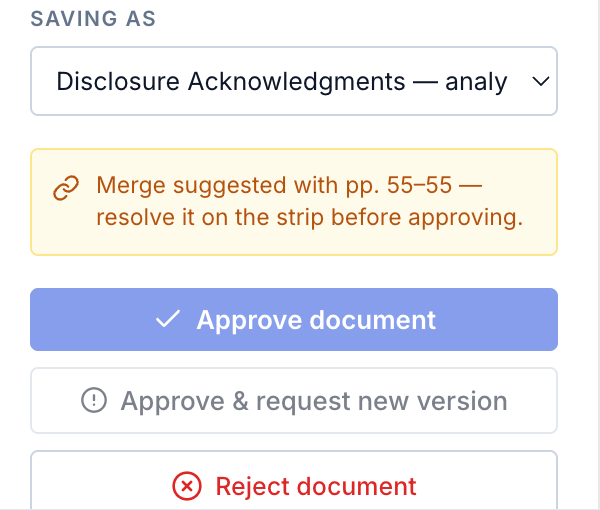
Filing a document in edit from anywhere else
Match, or any choice in ⋯, asks first:
A merge was suggested with balloon-rider.pdf (pp. 40–41).
Continue? Confirm match keeps it as it is and files it.
Doc Review is where the suggestion is resolved.

                     Cancel    Open in Doc Review    Confirm match
- Open in Doc Review opens the room on the document's first page.
- Confirm match records the suggestion as dismissed, then records your decision. The ledger has both:
merge.dismissedorsplit.dismissed, then the decision. - Cancel records nothing.
Over the API
GET /applications/{id}/documents marks the document with inEdit: the suggestion, and for a merge the other document's pages. Filing it returns a 409 until the suggestion is resolved or dismissed:
In edit: a merge was suggested — resolve it in Doc Review, or dismiss it first
To dismiss, send decision: "dismissed" to POST /applications/{id}/merge-resolutions or POST /applications/{id}/split-resolutions. To decide some of a split's cuts, add cuts: the pages where the documents after them start. Example: { "decision": "split", "cuts": [6] }.
A workflow files what it recommended, even with a suggestion open.
 Sheaf