 Sheaf
Sheaf
Doc Review
One document at a time, its pages beside the run's suggestion, with the tools to split, merge, move and archive pages before you approve it.
Doc Review is where you decide documents page by page. Open it with Doc Review in the app drawer, or the Review tab of a case.
The room
- The strip, along the bottom: every document the run found, as a card of page thumbnails, in page order. One by one steps through them; All documents shows every card.
- The page view, in the middle: the document's pages side by side (Document), or one page at a time (Page), with zoom.
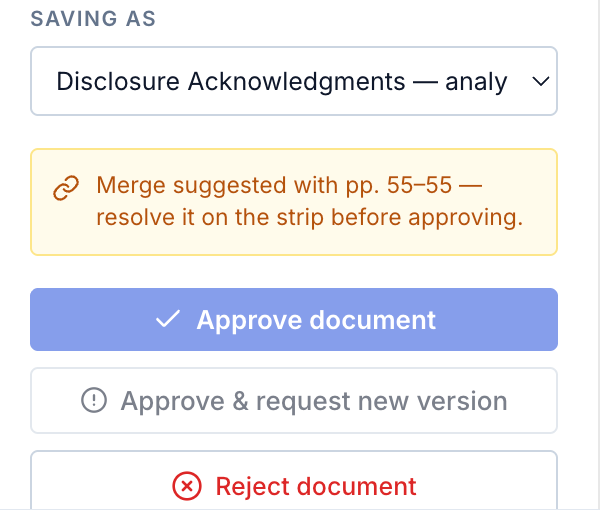
- The rail, on the right: what the document will be saved as, and the decision.
- The case name, at the top left: opens the case's details. See the case name.
- The run's steps, across the top: Preview, Parse, Classify, Extract and Intel, each opening what it produced.
The app drawer is hidden here, to leave the pages room. The drawer icon at the top left of the header opens it: click it, or rest the pointer on it for a moment. There is no back arrow: leave by the drawer, or with Esc.
Deciding a document
In the rail:
- Check Saving as: the requirement it will be filed under. Change it to any requirement on the list, or to Not on the list.
- Check the page decisions. Every page is good unless you mark it. A page marked bad is left out of the saved copy, and stays in the uploaded file.
- Choose Approve document (or press ↵), Approve & request new version, or Reject document.
Keys, as the room's footer lists them: ↵ approves the document, ← → navigate, Esc leaves the room.
Fixing pages first
| Tool | Acts on | What it does |
|---|---|---|
| Split here | a page | Starts a new document at this page. |
| Move page | pages | Moves pages earlier or later in this document, or into a new document. |
| Extract region | a page | Cuts out a region of the page as its own file, and reads it. |
| Download page | pages | The pages as a PDF. |
| Archive page | pages | Archives the pages. See tags and archive. |
| Merge with | a document | Joins another document onto this one. |
| Download document | a document | The document as one PDF. |
| Restore | a document | Puts archived pages back where they were. |
A changed document is a draft until you approve it: its card shows draft. Archiving is saved at once.
The run's suggestions
Merge and split suggestions show on the strip, and the rail names them before you approve. See documents in edit.
Leaving with drafts
If any card still shows draft when you leave the room, by the app drawer, Esc or any link, Doc Review asks first. It lists what this session saved and what the drafts still hold.
- Approve all approves each drafted document under its current filing, then leaves.
- Discard drafts and leave drops the drafts.
- Back to the room stays.

The browser's own back button and closing the tab do not ask.