 Sheaf
Sheaf
Tags and archive
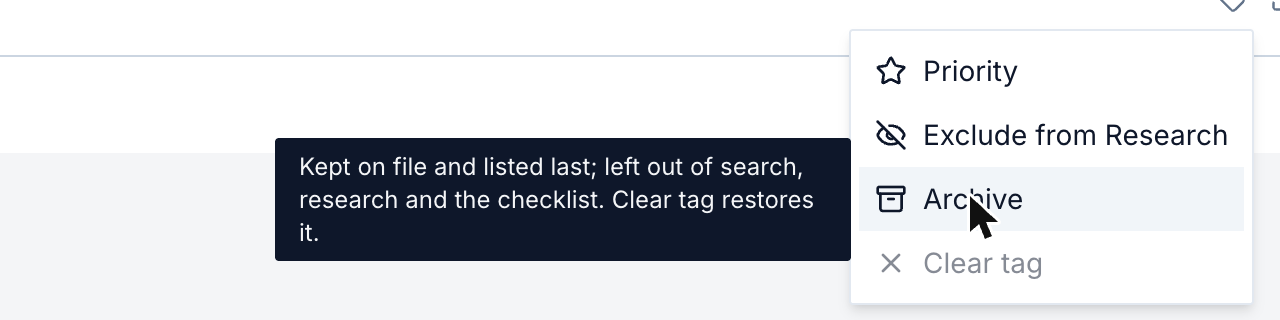
Mark up to three documents Priority, leave a document out of Research, or archive it. Clear tag undoes any of them.
The tag icon on every document row opens four choices. A tag belongs to the case: everyone working on the case sees it, and so do its Intel briefs.
| Choice | What it does |
|---|---|
| Priority | Lists the document first. Research reads its name as, for example, "Promissory Note (Priority)". At most three per case. |
| Exclude from Research | Keeps the document in the case, filed and downloadable, and leaves it out of search, Research and Intel. |
| Archive | Keeps the pages on file, listed last and dimmed, and leaves them out of search, Research and the checklist. |
| Clear tag | Removes the tag, or restores archived pages as they were. |
Archiving a matched document
A document already matched to a requirement can be archived, for example when it is no longer valid.
- Its requirement reads Missing again and stops counting in Matched Docs.
- Search and Research leave it out.
- Its saved copy moves into the history of the Register's approved documents, marked archived.
- Its approval stays in the ledger.
Clear tag restores it. The document is matched again, and no new approval is needed.
Only a whole matched document can be archived. To archive some of its pages, first take them out of it with Move page in Doc Review.
Pages the run recommends archiving
The run recommends archiving blank pages and exact duplicates. Doc Review offers Archive on them in one click, and a workflow archives them by itself.
What is recorded
Tagging writes document.tagged and document.untagged. Archiving and restoring write placement.recorded and placement.withdrawn. See the ledger.